Send and receive iMessages from browser or API
Share your existing iPhone number with your team.
Try it in 5 minutes with 3-day free trial.
No extra hardware or dedicated account required.
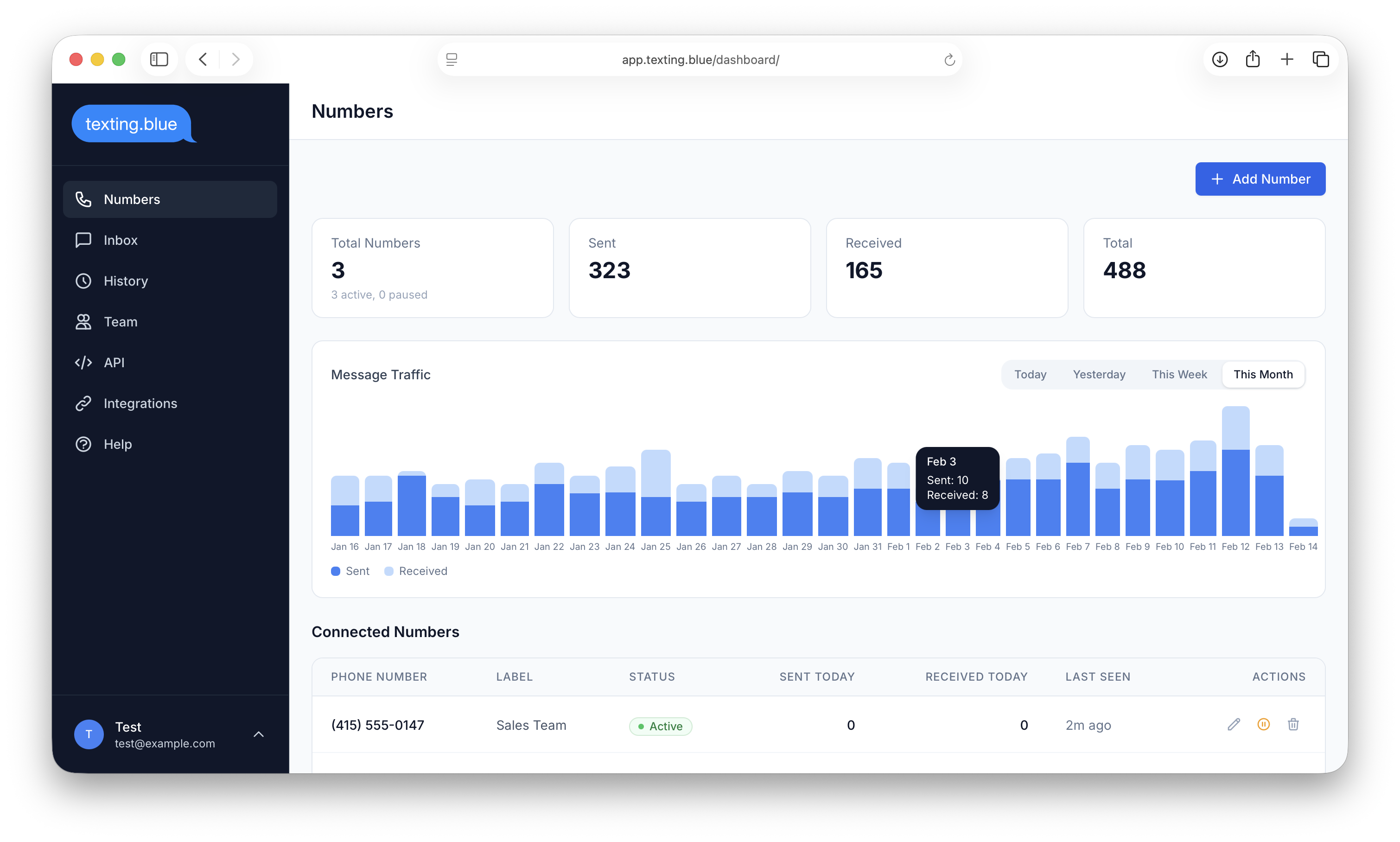
Start Sending iMessages in Under 5 Minutes
Three simple steps to share iMessage with your entire team.
Connect Your Number
Enter your business phone number and install our lightweight extension on your iPhone. Takes 2 minutes.
Invite Your Team
Add team members to your shared dashboard. They can access it from any browser on any device.
Start Messaging
Send and receive iMessages from the web. Every team member sees every conversation in real time.
No extra hardware or dedicated account required.
Everything You Need to Share iMessage at Work
A shared team dashboard that keeps everyone on the same page.
One Number. Every Reply.
Everyone on your team can see and respond to messages from your business number. Each reply shows who sent it, so you always know who said what.
Conversations, Not Chaos
Messages are organized by contact, just like your phone. Open any conversation, see the full history, and reply right from your browser.
Messages Appear Instantly
Incoming messages show up in your dashboard the moment they arrive. No refresh needed. Your team stays in sync, even across different time zones.
Blue Bubbles. Real Conversations.
Your customers see a normal iMessage from your real number. Blue bubbles, read receipts, and all. They never know you're using Texting Blue.
Control Who Sees What
Admins manage everything. Team members only access the numbers you assign them. Every message has an audit trail showing who sent it and when.
Connect to Your Workflow
Integrate with Shopify, n8n, Make, or Zapier to automate order updates, reminders, and follow-ups. Power users can use our REST API.
Built for Businesses That Rely on iMessage
See how teams in different industries use Texting Blue every day.
Respond to Leads Faster
Share your office number across all agents. When a lead texts about a listing, the first available agent replies. No more leads slipping through the cracks.
Order Updates Your Customers Actually Read
Send shipping confirmations and delivery updates via iMessage. Higher open rates than email or SMS. Customers can reply with questions and reach a real person.
Appointment Reminders That Work
Automate appointment reminders via iMessage. Patients, clients, and customers are more likely to see and respond to a blue bubble than an SMS or email.
Delegate Without Losing Control
Share your business number with your assistant or team. They reply on your behalf. You see everything. Your clients see a conversation from one number.
Connects to the Tools You Already Use
Automate iMessage workflows with the platforms your team already uses.
n8n
Build custom iMessage workflows with our community node
Zapier
Connect Texting Blue to 6,000+ apps
Make
Visual automation builder for iMessage workflows
REST API
Full programmatic access to send, receive, and manage messages
Shopify
Automated order confirmations, shipping updates, and support
Simple, Transparent Pricing
Start your free 3-day trial. Connect your number in 5 minutes.
Lite
For solo operators and small teams
- Shared team dashboard
- Unlimited team members
- Up to 100 messages per day
- Only basic messaging features (text)
- API access for power users
- Webhook and automation
- Email support
Standard
For growing teams
- Shared team dashboard
- Unlimited team members
- Higher message limits
- Advanced messaging features (images, and more)
- Advanced automations and webhooks
- Priority support
Business
For larger operations
- Shared team dashboard
- Unlimited team members
- Higher daily message limits
- Advanced features (messaging & calls)
- Custom integrations
- Dedicated support
- SLA
All plans include a 3-day free trial. No extra hardware or dedicated account required.
What Our Customers Say
Frequently Asked Questions
Everything you need to know about Texting Blue.
How does Texting Blue work?
Texting Blue connects to your existing iPhone and phone number through a lightweight extension. Once installed, your iMessages start syncing to a web dashboard that your entire team can access from any browser. You send and receive messages as usual -- Texting Blue just makes them visible and actionable for everyone on your team.
Do I need a Mac or iPhone to use the dashboard?
You need an iPhone with the phone number you want to share -- this is the device that actually sends and receives iMessages. But the dashboard itself works in any modern browser on any device. Your team members can use Windows, Android, Chrome, or anything else to view and reply to messages.
Does the recipient know I'm using Texting Blue?
No. Recipients see a normal iMessage from your phone number. Blue bubbles, delivered and read receipts, everything looks exactly the same as a regular iMessage conversation. Texting Blue is invisible to the people you're messaging.
Can I use my existing phone number?
Yes. Texting Blue works with your current iMessage-enabled phone number. You do not need to port your number, get a new number, or change anything about your phone plan.
Is my data secure?
Yes. Messages are encrypted in transit (TLS) and at rest. We never store your Apple ID or iCloud credentials. Your messages pass through your own iPhone -- we do not route them through third-party cloud infrastructure.
What happens if I cancel?
Your phone number disconnects from Texting Blue and goes back to normal iMessage operation. Your message history on the dashboard is deleted within 30 days of cancellation. Your actual iMessages on your phone are not affected.
How many messages can I send per day?
The Lite plan supports up to 100 messages per day. This is designed for conversational business messaging -- responding to customer inquiries, sending follow-ups, and automating notifications. It is not built for mass marketing blasts.
Can I send messages to Android users?
Texting Blue is optimized for iMessage, which means iPhone-to-iPhone messaging. Messages to Android users will fall back to SMS if your iPhone and carrier support it, but this is not our primary use case.
What integrations are available?
Texting Blue has pre-built integrations with Shopify (order updates) and n8n (workflow automation). Zapier and Make integrations are coming soon. For power users who want full control, we also offer a REST API and webhooks for custom workflows.
Do I need technical skills to set up Texting Blue?
No. The setup takes under 5 minutes and does not require any coding. Install our extension on your iPhone, create your dashboard account, and invite your team. Automations with Shopify, n8n, and other tools are set up through visual interfaces -- no coding needed. A REST API is available for power users who want to build custom integrations.
Ready to Try iMessage for Your Business?
Start your free 3-day trial. Connect your number in 5 minutes.
No extra hardware or dedicated account required.